The Complete Guide to Pitch Deck Presentation Templates: Crafting a Compelling Visual Story for Your Business
In today's fast-paced business environment, first impressions are everything. Whether you're a startup founder seeking venture capital, a sales professional pitching a new product, or an entrepreneur presenting your company profile to potential partners, the way you present your ideas can determine your success. A pitch deck presentation template is no longer a luxury — it is a necessity. It provides the structure, design, and professional polish that transforms raw information into a compelling narrative. But what exactly makes a pitch deck template so powerful, and how can you leverage one to elevate your presentation?
This guide will walk you through everything you need to know about pitch deck templates: their purpose, key features, practical applications, and how to choose the right one for your needs. By the end, you will understand why a simple, contemporary, yet powerful design can make the difference between a forgettable pitch and a game-changing opportunity.
What Is a Pitch Deck and Why Does It Matter?
A pitch deck is a brief presentation — typically 10 to 20 slides — that provides an overview of your business, product, or idea to potential investors, clients, or partners. Its primary purpose is to tell a story: where you are, where you're going, and why others should join you on that journey. Unlike a detailed business plan, a pitch deck is visual, concise, and designed to spark interest and conversation.
The significance of a well-designed pitch deck cannot be overstated. In the startup world, investors often review hundreds of decks each month. A cluttered, poorly designed deck will be dismissed in seconds, while a clean, professional deck can secure a meeting. Beyond fundraising, pitch decks are used in corporate presentations, product launches, partnership proposals, and even internal strategy sessions. In every case, the goal is the same: communicate your message clearly and memorably.
Modern life is saturated with information. People have limited attention spans and are accustomed to high-quality visual content. A pitch deck that relies solely on text and bullet points will fail to engage. This is where a pitch deck presentation template steps in — it provides the visual framework that helps you stand out.
The Anatomy of an Effective Pitch Deck Template
Not all templates are created equal. A generic template might save you time, but it won't necessarily help you tell your story. A truly effective pitch deck presentation template is designed with purpose, flexibility, and aesthetics in mind. Let's break down the core components that make a template valuable.
Clean and Professional Slide Layouts
The best templates use clean, uncluttered layouts that guide the viewer's eye naturally. Each slide should have a clear hierarchy — a strong headline, supporting visuals, and minimal text. This allows your audience to absorb key points quickly. A contemporary design doesn't mean flashy or distracting; it means using whitespace, balanced typography, and subtle accents to create a polished, modern look.
Creative Photo Layouts and Visuals
Images speak louder than words. A great template includes creative photo layouts that let you showcase your team, product, or workspace in an engaging way. Instead of simply inserting a picture on a blank slide, a well-designed layout integrates images with text, using overlays, grids, and frames to create a cohesive visual story. This is especially important for company profile slides, where you want to convey professionalism and personality simultaneously.
Infographics, Tables, and Diagrams
Data is a critical part of any pitch deck — market size, revenue projections, user growth, competitive analysis. But raw numbers are hard to digest. A powerful template includes infographics, tables, and diagrams that turn complex data into clear, visual insights. Infographics can illustrate processes or timelines, tables can present comparisons or metrics, and diagrams (such as Venn diagrams, flowcharts, or pie charts) can explain relationships or proportions. These elements make your deck more informative and more persuasive.
Vector Icons and Visual Hierarchy
Vector icons are small but mighty design elements. They replace repetitive text, add visual interest, and help break up information into scannable chunks. For example, a lightbulb icon next to "Innovation," a handshake icon next to "Partnerships," or a dollar sign icon next to "Revenue Model" — these visual cues speed up comprehension and make your slides look modern and intentional. Combined with a clear visual hierarchy (size, color, placement), icons guide the audience through your narrative without overwhelming them.
Key Features to Look for in a Pitch Deck Template
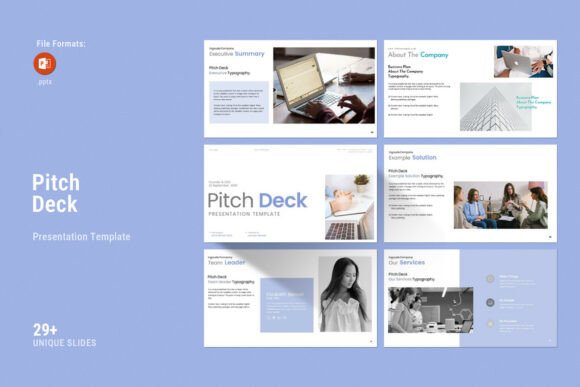
When selecting a pitch deck presentation template, you should evaluate it based on practical features that affect usability and final output. Based on the template described — which includes a PowerPoint .PPTX file, a help file, and a range of design assets — here are the most important features to consider:
- Compatibility Across Platforms: The template should work on both Apple and Windows systems, ensuring that you and your collaborators can edit and present seamlessly regardless of your operating system.
- Slide Count and Variety: A template with around 30 slides gives you enough flexibility to build a complete pitch deck without running out of layouts. Look for a mix of title slides, content slides, data slides, and closing slides.
- Master Slides Layout: Master slides allow you to apply consistent fonts, colors, and backgrounds across all slides at once. This feature saves hours of manual formatting and ensures a uniform look.
- Drag-and-Drop Image Replacement: The ability to drag and drop to change pictures is a major time-saver. You don't need design skills to swap images — just click and replace.
- Easy Color Change: Your brand colors should be easy to apply. A good template lets you change the color scheme with a few clicks, so your deck reflects your identity.
- Full HD Resolution (1920x1080px): Presentations are often projected on large screens or shared on high-resolution monitors. A 16:9 Full HD ratio ensures your slides look sharp and professional on any display.
- Free Fonts and Editable Elements: The template should use freely available fonts and allow you to edit every element — text, shapes, icons, and colors — without restrictions.
- Support and Documentation: A help file and responsive support from a skilled designer can make the difference between a smooth experience and a frustrating one. If you encounter any issues, knowing that help is available gives you peace of mind.
How to Use a Pitch Deck Template Effectively
Having a high-quality template is only half the battle. You also need to use it effectively to tell your story. Here are some practical tips to get the most out of your pitch deck presentation template:
Start with a Clear Narrative Structure
Before you begin designing, outline your story. A classic pitch deck structure includes: problem, solution, market size, business model, traction, team, competition, and ask. Each slide should advance one key idea. Use the template's layouts to highlight that idea without extra clutter.
Customize the Visuals to Your Brand
Take advantage of the easy color change feature to match your brand palette. Replace placeholder images with your own photos — team members, office space, product shots. Use the vector icons to represent your key concepts. The goal is to make the template feel like your own.
Use Data Visualizations to Build Credibility
Replace generic charts with infographics and diagrams that clearly illustrate your data. For example, instead of a table with numbers, use a bar chart to show growth. Instead of a bullet list of competitors, use a positioning diagram. Visual data is more persuasive and easier to remember.
Keep Text Minimal and Focused
A common mistake is trying to fit too much text on a slide. Use the template's layout to guide you — if a slide has room for a headline and three bullet points, stick to that. Use speaker notes for detailed explanations. Your slides should support your spoken pitch, not replace it.
Common Misunderstandings About Pitch Deck Templates
Some people assume that using a template means sacrificing originality. That is a myth. A template is a foundation, not a cage. The best templates are highly customizable — you can change colors, fonts, images, and layouts to create a unique presentation that still benefits from professional design principles.
Another misconception is that pitch decks are only for startups seeking venture capital. In reality, pitch decks are used across industries: by non-profits presenting to donors, by educators proposing new programs, by corporate teams pitching internal initiatives, and by creative professionals showcasing portfolios. A pitch deck presentation template is a versatile tool for anyone who needs to communicate a vision clearly and persuasively.
There is also a belief that design doesn't matter as long as the content is strong. This overlooks the reality of human psychology. People judge presentations within seconds. A polished design signals professionalism, preparation, and respect for the audience. Content and design work together — great content deserves great presentation.
How a Pitch Deck Template Fits into Modern Business and Creativity
In the modern workplace, everyone is expected to communicate visually. Whether you're in sales, marketing, product development, or leadership, the ability to create a compelling presentation is a core skill. A pitch deck presentation template democratizes design — it gives non-designers access to professional layouts, so they can focus on their message rather than struggling with software.
For entrepreneurs and small business owners, time is a precious resource. A template that includes 30 slides, master slides, drag-and-drop images, and easy color change can reduce presentation creation time from days to hours. This efficiency allows you to iterate faster, test different narratives, and refine your pitch based on feedback.
In education and training, instructors use pitch decks to present curricula, research findings, or program proposals. The Full HD 16:9 ratio ensures compatibility with modern projectors and screens, while the infographics and diagrams help simplify complex topics for learners.
Creative professionals — designers, photographers, architects, writers — use pitch decks to showcase their portfolios and win new projects. The creative photo layouts in a professional template allow them to present their work in a gallery-like format that highlights their talent.
Practical Examples: When a Pitch Deck Template Makes a Difference
Consider a startup founder pitching to a group of angel investors. They have a solid business plan and a promising product, but their slide deck is a plain white background with black text and a few clip-art images. The investors struggle to stay engaged. Now imagine the same founder using a pitch deck presentation template with clean layouts, infographics showing market growth, vector icons highlighting key benefits, and professional photo layouts showing the team. The difference is night and day. The template doesn't change the content — but it changes how the content is perceived.
In a corporate setting, a sales manager presents quarterly results to the executive team. Using a template with tables, charts, and diagrams, the manager presents revenue trends, regional comparisons, and forecast projections in a way that is easy to understand and act upon. The executives can quickly grasp the story behind the numbers.
An educator developing a new course proposal uses a pitch deck template to present the curriculum outline, learning objectives, target audience, and expected outcomes. The infographics illustrate the learning journey, while the diagrams show how modules connect. The proposal is approved faster because it is clear and visually compelling.
Final Thoughts: Elevate Your Work with a Professional Pitch Deck Template
A pitch deck presentation template is more than a design asset — it is a strategic tool for communication. By providing a professional framework with creative photo layouts, infographics, tables, vector icons, diagrams, and customizable features, it empowers you to present your work and your company profile at a higher level. The template described here — with its 30 slides, Full HD resolution, cross-platform compatibility, and drag-and-drop simplicity — is designed to make you look good while saving you time and effort.
Whether you are preparing for a high-stakes investor meeting, a client presentation, or an internal strategy review, investing in a quality template is a smart decision. It allows you to focus on what matters most: your message. And with real support from skilled designers, you can confidently customize your deck knowing that help is available if needed.
So go ahead — take advantage of the tools available to you. Use a pitch deck presentation template to tell your story with clarity, confidence, and visual flair. Your audience will thank you, and your ideas will finally get the attention they deserve.