Proposal Keynote Template: A Clean and Professional Tool
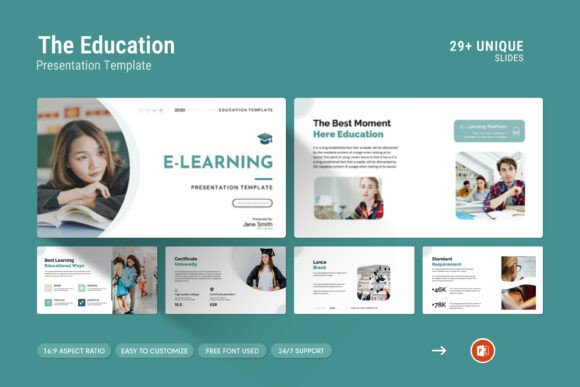
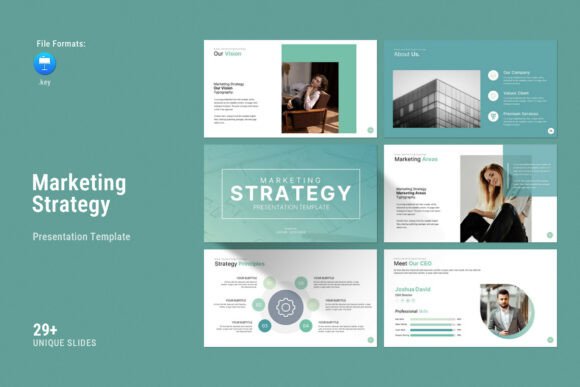
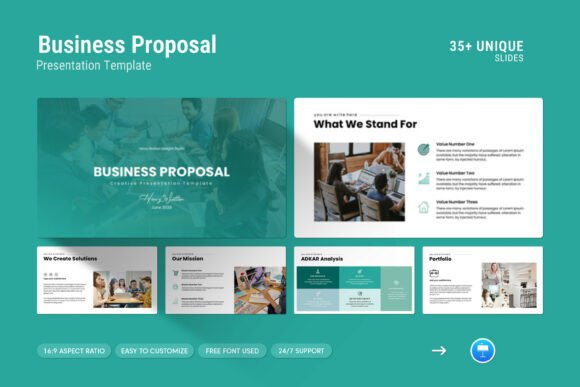
When you need to present a proposal, the design of your slides can speak as loudly as the words on them. The Proposal Keynote Template is built for this exact purpose. It offers a simple, contemporary, and powerful design system that includes creative photo layouts, infographics, tables, vector icons, and diagrams. With 36 slides, full HD resolution, and compatibility across both Apple and Windows platforms, this template is designed to help you showcase your work and company profile at a higher level. Whether you are sharing a business plan, pitching a project, or presenting research, the template aims to make your content look polished without requiring advanced design skills.
What makes this template different from a basic slide deck is the thought behind its structure. It comes with master slide layouts, easy colour changes, and drag-and-drop image placement. These features are not just nice extras — they directly affect how quickly you can build a presentation and how consistent the final result will feel. The template is fully editable, and the free font used means you do not need to purchase additional licenses. For anyone who has ever spent hours aligning boxes or searching for the right icon, this template offers a practical shortcut.
Why Different Audiences Find Value in This Template
Not every presentation tool fits every person. The Proposal Keynote Template works across a wide range of use cases, but its relevance depends on your goals, experience level, and the type of proposal you are building. Below, we explore how different users might approach and benefit from this template.
Beginners and First-Time Presenters
If you are new to creating presentations, the biggest challenge is often knowing where to start. You might have the content ready but feel unsure about layout, colour scheme, or visual hierarchy. This template removes that uncertainty. The pre-built slides give you a clear structure to follow. You can drop in your text, replace placeholder images with your own, and have a professional-looking deck in a fraction of the time it would take to build from scratch.
For a beginner, the drag-and-drop functionality is a standout feature. You do not need to learn complex design software or understand slide master mechanics. The template handles consistency across all 36 slides, so you can focus on writing your message rather than worrying about alignment or font sizes. The included help file also guides you through basic steps, which reduces the learning curve even further.
Ease of use is the primary priority for this group. The template's simple colour change feature means you can adapt it to match your brand or project theme without touching a single line of code. If you are a freelancer preparing your first client pitch or a student presenting a capstone project, this template gives you a confident starting point.
Professionals and Business Owners
For professionals who regularly prepare proposals, time is money. You need a template that is not only fast to work with but also flexible enough to represent your company's identity. The Proposal Keynote Template includes infographics, diagrams, and tables — elements that help you present data and processes clearly. If you are a small business owner pitching to a potential investor, these visual tools can make your financial projections or timeline look credible and well-organised.
Commercial value matters here. A template that works across both Apple and Windows ensures your team can collaborate regardless of their operating system. The full HD resolution (1920x1080) also means your slides look sharp on large screens or when shared digitally. For a business owner, reliability and quality are not just nice features — they reflect directly on your brand. A pixelated or misaligned slide can undermine trust before you even speak a word.
Another practical example is a marketing professional presenting a campaign proposal to a client. Using the vector icons and creative photo layouts, you can show mockups, timelines, and expected outcomes in a visually engaging way. The template's contemporary style helps your content feel current rather than dated.
Creators and Design-Minded Users
If you already have some design experience, you might worry that templates are too restrictive. However, the Proposal Keynote Template is designed with flexibility in mind. The master slides allow you to customise colours, fonts, and layouts without breaking the overall structure. You can treat the template as a foundation and then layer your own creative choices on top.
For creators, the quality of included assets matters. The template comes with vector icons and diagrams that are fully editable. This means you can resize, recolour, or combine them to fit your specific narrative. If you are a brand strategist or a content creator building a visual story, you will appreciate that the template does not force you into a rigid format. Instead, it provides a flexible grid that supports your ideas.
Creators often evaluate a tool by its long-term usefulness. A template with 36 slides and multiple layout types can be reused for different projects — from investor decks to internal strategy documents. The free font and easy colour change also mean you are not locked into one aesthetic. You can adapt the same template for different clients or campaigns, which adds to its value over time.
Educators and Trainers
Educators and trainers need to present information clearly and keep learners engaged. The Proposal Keynote Template offers infographics and diagrams that help break down complex topics into digestible visuals. If you are teaching business strategy, project management, or communication skills, the template can serve as both a presentation tool and a teaching aid.
For example, you could use the table slides to show comparison data, the diagram slides to explain a process, and the photo layout slides to showcase case studies. The clean design ensures that your students focus on the content rather than being distracted by busy backgrounds or inconsistent formatting.
Learning value is a key priority for educators. The template's help file and straightforward editing process mean you can spend less time on technical setup and more time on your lesson content. Additionally, because the template is fully editable, you can modify slides to suit different class levels or topics. This adaptability makes it a practical resource beyond a single presentation.
Hobbyists and Event Organisers
Even if you are not a business professional, you might still need to present a proposal. Hobbyists planning a community event, a club project, or a personal initiative can use this template to communicate their ideas more effectively. The professional look of the slides can help your proposal be taken more seriously, whether you are presenting to a local council, a sponsorship committee, or a group of volunteers.
For hobbyists, cost is often a concern. The Proposal Keynote Template uses free fonts and includes a comprehensive set of slides, which means you get a lot of value without a large budget. The simple colour change feature lets you match the template to your event theme without needing design software skills. If you are organising a charity fundraiser or a community workshop, this template helps you present your vision with clarity and professionalism.
How to Evaluate If This Template Matches Your Needs
Before choosing any presentation tool, it helps to consider your specific goals and constraints. The Proposal Keynote Template works well for users who value speed, consistency, and a professional appearance. However, the right fit depends on a few factors.
If your priority is ease of use and you want a solution that works out of the box, this template delivers. Beginners and busy professionals will appreciate the drag-and-drop functionality and the included help file. If you need a flexible design that you can customise deeply, the master slides and editable components give you that freedom without requiring advanced skills.
Consider the type of content you are presenting. If your proposal involves data, timelines, or comparisons, the infographics, tables, and diagrams will save you time and improve clarity. If your proposal is more narrative or image-heavy, the creative photo layouts allow you to showcase visuals without overwhelming the text.
Also think about your audience. A clean, contemporary design communicates professionalism and attention to detail. Whether you are presenting to an investor, a client, a class, or a committee, the visual quality of your slides can influence how your message is received. The template's full HD resolution ensures that your content looks sharp on any screen.
Practical Examples for Different Reader Types
- Freelancer pitching to a client: Use the template's infographic slides to show project phases and deliverables. The vector icons help break down complex services into simple visual points.
- Small business owner seeking investment: Leverage the table slides to present financial projections and the diagram slides to explain your business model. The consistent design builds credibility.
- Educator teaching a workshop: Adapt the template for different sessions by changing colours and swapping images. Use the photo layouts to include real-world examples that support your lessons.
- Event organiser presenting a proposal: Quickly customise the template with your event colours and logo. The professional look helps your proposal stand out to sponsors or decision-makers.
- Marketer creating a campaign deck: Use the creative photo layouts to showcase mockups and the diagram slides to map out customer journeys. The contemporary style keeps the presentation fresh.
Long-Term Value and Reliability
A good template is not a one-time tool — it should serve you across multiple projects. The 36 slides included in the Proposal Keynote Template cover a wide range of layouts, which means you can reuse them for different types of proposals. The easy colour change and editable components allow you to adapt the same base design for various clients, topics, or branding guidelines.
The fact that the template works on both Apple and Windows adds to its long-term reliability. If you switch devices or collaborate with others, the file remains compatible. The full HD resolution also ensures that your presentations look consistent across different screens and projectors.
Support is another factor that affects long-term usefulness. The template comes with a help file, and support is available from the designer. This means if you run into a question or need guidance, help is accessible. For users who are not deeply technical, this can make a significant difference in their experience.
Ultimately, the Proposal Keynote Template is a practical tool for anyone who needs to present ideas in a clear, professional, and visually engaging way. By focusing on your content and letting the template handle the design structure, you can save time and communicate with greater impact. Whether you are a beginner finding your footing or an experienced professional refining your pitch, this template offers a solid foundation that adapts to your needs.