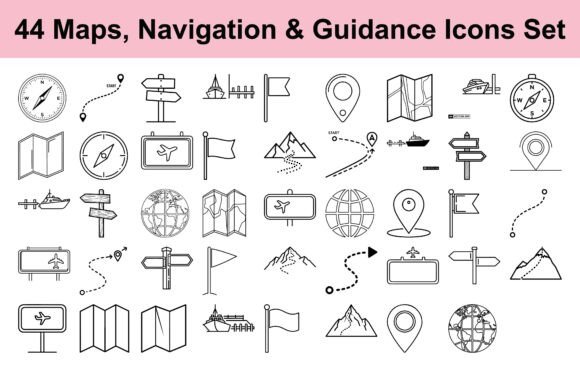
44 Navigation and Guidance Icon Set: Essential Visuals for Wayfinding and Exploration Projects
When you are working on a travel app, a tourism website, a map interface, or any location-based project, you quickly realise that visuals matter as much as functionality. People need to understand directions instantly, and the right icons can make that happen without a single word. The 44 Navigation and Guidance Icon Set offers a complete collection of symbols designed to communicate navigation, exploration, and wayfinding concepts clearly and professionally. Whether you are building a digital platform or producing printed materials, this set gives you a practical, ready-to-use toolkit for guiding your audience.
Why navigation icons matter for your projects
Every time someone uses a map, follows a signpost, or looks for a compass symbol, they rely on visual cues that are intuitive and unambiguous. If you are developing a travel resource, a guidebook, or an adventure blog, you face the challenge of presenting directional information in a way that feels natural and easy to grasp. Poorly designed icons can confuse users, slow down their experience, or make your work look unpolished. The 44 Navigation and Guidance Icon Set addresses this need head-on by providing symbols that are simple, readable, and consistent in style. This means your audience can focus on the information itself rather than decoding unclear imagery.
What the icon set includes and how it helps
This collection covers the essential symbols you would expect for navigation and guidance: compasses, maps, flags, signposts, and various directional indicators. Each icon is crafted in a clean, modern vector style, which gives you flexibility across different formats and sizes. You receive the files in AI, EPS, and JPG formats, so you can edit the vectors or use high-resolution images straight away. For designers who need to customise colours, scale icons without losing quality, or integrate them into larger layouts, the vector files are especially valuable. If you work outside design software, the JPG files are ready for immediate use in documents, presentations, or web content. This variety ensures that the 44 Navigation and Guidance Icon Set fits into your workflow, regardless of your technical background.
Practical applications across different use cases
One of the strengths of this icon set is its versatility. Different users will approach it in different ways, depending on their goals and the medium they are working with. Here are several scenarios where the set can make a real difference.
Travel apps and location-based services
If you are building an app that helps people find their way around a city, hike a trail, or locate points of interest, you need icons that are instantly recognisable. Compass symbols, map pins, and directional arrows become the backbone of your user interface. With the 44 Navigation and Guidance Icon Set, you can implement these elements without spending hours creating them from scratch. The clean vector style ensures that icons remain sharp on both small mobile screens and larger tablet displays. You can also adjust colours to match your brand, making the experience feel cohesive and professional.
Tourism websites and travel blogs
For websites that promote destinations, provide travel guides, or share adventure stories, visual clarity helps visitors quickly understand routes, landmarks, and itineraries. Using signpost icons for recommended stops, flag symbols for key locations, or map markers for interactive maps can improve the user experience significantly. The 44 Navigation and Guidance Icon Set gives you a consistent visual language that ties your content together. Whether you are writing about hiking trails in the Alps or city tours in Tokyo, these icons help your readers feel oriented and informed.
Guidebooks and printed materials
Printed guides, brochures, and maps require icons that reproduce well at various sizes. Because the set includes high-resolution JPG files and scalable vector formats, you can use the same symbols on a large poster or a pocket guide without worrying about pixelation. This is especially useful for tourism boards, travel agencies, or publishers who produce materials for visitors. A well-placed compass icon on a map or a flag symbol on a tour itinerary can make the information easier to follow, which ultimately improves the reader's experience.
Infographics and educational content
If you create infographics about travel statistics, navigation techniques, or geographic topics, you need visuals that communicate data without clutter. Directional icons from the 44 Navigation and Guidance Icon Set can serve as anchors for your information, helping viewers understand patterns, routes, or comparisons. For example, you might use a signpost icon to indicate different travel routes, a map icon to represent exploration zones, or a compass to show orientation. This approach makes your content more engaging and easier to digest.
Stock illustrations and design assets
Designers who work on multiple projects often need a reliable library of icons they can reuse across different clients and briefs. The 44 Navigation and Guidance Icon Set works well as a resource you can pull from whenever a navigation-related visual is needed. Because the files are fully editable in AI and EPS formats, you can adapt them to suit varying aesthetic requirements. This saves time and ensures that you always have professional-grade assets at hand.
How different users can get the most out of the set
Your approach to using the 44 Navigation and Guidance Icon Set will depend on your role and the nature of your project. If you are a graphic designer, you will likely appreciate the vector source files that allow complete control over colour, size, and composition. You can combine icons with typography, add them to custom illustrations, or integrate them into complex layouts. For a marketing professional working on a tourism campaign, the JPG images provide a quick way to add navigation symbols to social media graphics, email newsletters, or presentation slides without needing design software. If you are a developer building a location-based service, the clean and simple style of the icons ensures they load quickly and display consistently across different devices and screen resolutions. The set is designed to be accessible to a wide range of users, and the file formats reflect that flexibility.
Practical considerations when using the icon set
To get the best results from the 44 Navigation and Guidance Icon Set, keep a few practical points in mind. First, think about the scale at which the icons will be viewed. Icons used on small screens need to retain their readability, and the vector format makes it easy to test different sizes. Second, consider colour consistency across your project. Because the icons come in a clean vector style, you can adjust their palette to match your brand or the tone of your content. Third, pay attention to the context in which each icon appears. A compass symbol might serve a different purpose on a map than it does in a header illustration, so test placement to ensure clarity. Finally, remember that icons work best when they are part of a larger navigational system. Use them consistently throughout your project so that users quickly learn what each symbol represents.
Why this set is a useful resource for your work
Navigation and guidance are universal needs, but communicating them visually requires thought and precision. The 44 Navigation and Guidance Icon Set removes the guesswork by offering a collection of symbols that are both professional and practical. Whether you are designing for a travel app, a tourism website, a guidebook, an infographic, or any other location-based project, these icons help you convey direction, exploration, and wayfinding with clarity. The multiple file formats ensure that you can use them in digital or print media without technical barriers. By incorporating this set into your work, you save time, maintain a high standard of visual quality, and provide your audience with the intuitive cues they need to navigate your content confidently.
In a world where people rely on clear directions more than ever, having a reliable set of navigation and guidance icons at your disposal is a practical advantage. The 44 Navigation and Guidance Icon Set gives you that advantage, helping you create projects that are not only visually appealing but also genuinely useful for your audience.