Modern House Icon Bundle: Avoiding Common Pitfalls in Real Estate and Design Projects
If you have ever spent hours searching for the right home icon for a real estate flyer, only to end up with a blurry, mismatched graphic, you understand the frustration. The Modern House Icon Bundle offers a clean solution, but even with a quality set, small mistakes can undermine your results. Whether you are a realtor preparing marketing materials, a designer building an app interface, or a hobbyist working on scrapbook art, knowing what to watch for saves time, money, and creative energy.
This article walks through common misunderstandings and overlooked details when selecting, downloading, and using a house icon set. You will learn practical ways to avoid these errors and get the most out of your purchase.
Mistake 1: Assuming All Icon Formats Are Interchangeable
One of the most frequent errors people make is treating EPS, SVG, PNG, and JPG files as if they work identically in every project. They do not. Each format serves a specific purpose, and using the wrong one can lead to pixelation, editing difficulties, or wasted time.
The Modern House Icon Bundle includes all four formats, which is excellent, but only if you understand when to use each. For instance, EPS and SVG files are vector-based, meaning they scale infinitely without losing quality. These are ideal for logo design, large-format printing, or any situation where you might resize an icon later. PNG files, conversely, are raster images with transparent backgrounds, perfect for web use or layering in design software. JPG files work for simple digital displays but lack transparency and can show compression artifacts.
How to avoid this mistake: Before you start a project, decide whether you will need to resize, edit colors, or place the icon on a colored background. If you anticipate any of these, reach for the EPS or SVG file first. Save the PNG for quick social media graphics and the JPG for previews only.
Mistake 2: Overlooking the Value of Consistent Design Styles
Another common oversight is mixing icon styles from different sources in the same project. You might love the modern roof lines in one bundle but prefer the window style from another set. The result is a disjointed visual that looks unprofessional, even if each individual icon is high quality.
A well-curated set like the Modern House Icon Bundle offers ten designs with a unified aesthetic. All icons share similar line weights, proportions, and detailing. This consistency is crucial for branding materials, app interfaces, or any collection where icons appear together. When you use icons that feel cohesive, your audience perceives professionalism and attention to detail.
To avoid a mismatched look, commit to using only icons from this bundle for a given project. If you need additional icons, supplement them with simple shapes you create yourself that match the same visual language. Do not grab free icons from random websites without checking their style against the rest of your layout.
Mistake 3: Neglecting Color Flexibility and Brand Alignment
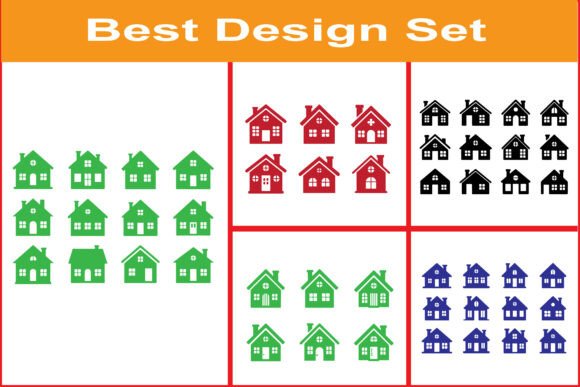
The bundle includes icons in green, red, black, and blue, presented in neat grids. Some buyers mistakenly think these are the only available colors. In truth, vector formats allow you to recolor every icon to match your brand palette, client preference, or seasonal campaign.
If you are a realtor, using a red house silhouette for a spring open house might feel jarring when your brand uses navy and gold. Instead, open the EPS or SVG file in design software like Adobe Illustrator, Affinity Designer, or even free tools like Inkscape, and change the fill color to match your brand guidelines. This simple step transforms a generic icon set into a personalized asset.
Ignoring this flexibility leads to projects that feel disconnected from your brand identity. Always test color changes on a small sample icon before applying them to the whole set.
Mistake 4: Forgetting Compatibility with Cutting Machines
For crafters using Cricut or Silhouette machines, the Modern House Icon Bundle is a goldmine. However, a recurring frustration is importing the wrong file type and finding the machine cannot read it, or cuts come out with extra lines.
The bundle includes SVG files, which are the preferred format for most cutting machines. Yet people often download the JPG or PNG versions and try to convert them. This adds unnecessary steps and can degrade quality. Worse, some automatic tracing tools create jagged edges on curves.
Avoid this problem by always choosing the SVG file for cutting projects. If your software requires a specific format, use a reliable converter that preserves vector data. Test cut a small shape first before committing to a full project sheet.
Mistake 5: Misunderstanding Licensing for Commercial Use
This is one of the most expensive mistakes you can make. Creators, small business owners, and marketers sometimes assume that any purchased icon bundle includes full commercial rights with no restrictions. That is not always true.
While the Modern House Icon Bundle is designed for digital print use and branding applications, always verify the specific license terms included in the download file. Some bundles allow unlimited commercial use, while others limit the number of products you can create or require attribution. Using icons in a way that violates the license can lead to takedown notices or legal issues.
To stay safe, read the license file immediately after purchase. If you plan to resell the icons as part of a template or final product, confirm that use is permitted. Keep a screenshot of the license terms in your project folder for future reference.
Mistake 6: Ignoring File Organization and Backup
After downloading a zip file with seven EPS, seven JPG, seven SVG, and seven PNG files, it is tempting to dump all of them into a single folder and hope for the best. Later, when you need a specific color or style, you waste time searching through disorganized folders.
Better approach: Create a dedicated folder on your computer or cloud drive called "Modern House Icon Bundle." Inside it, create subfolders by format, color, or intended use. This small habit saves hours over time. It also helps if you need to share files with a colleague or use them across multiple devices.
Even more important: back up the original zip file. If your hard drive fails, you will not have to repurchase the bundle. Store a copy on an external drive or a reliable cloud service.
What to Check Before You Buy or Use the Bundle
Before you click download or start a project, run through this brief checklist:
- Do you have compatible software? EPS files require vector editing programs, while SVG and PNG work with most common tools.
- What resolution do you need? For large prints, vector formats are essential. For web, PNG at 300 DPI is usually sufficient.
- Does the bundle include enough design variety? With ten designs featuring different roofs, windows, and chimneys, this set covers many use cases.
- Will the icons need editing? If you plan to change colors or combine elements, confirm that the EPS or SVG files are fully editable and not flattened.
Practical Advice for Getting the Most Value
Experienced designers buy the Modern House Icon Bundle not just for the icons themselves, but for the time they save. Instead of drawing house silhouettes from scratch, you get a library of polished shapes ready to drop into any layout. Use them for:
- Real estate flyers and postcards that need clean, modern visuals
- Website icons for property listings or navigation menus
- Presentations for architectural proposals or urban planning
- Social media graphics that stay on-brand
- Cutting machine projects like stickers, signs, or cardmaking
One practical tip: start with the black icons for testing layouts and contrast. Once your composition is solid, switch to your brand color using the vector file. This workflow prevents color distractions during the design phase.
Another approach worth trying: combine two or three different house styles from the bundle to create a neighborhood cluster in a single graphic. This works beautifully for infographics or as a background pattern for a real estate brochure cover.
Final Thoughts on Making Smart Choices with Icon Bundles
The Modern House Icon Bundle is more than a collection of pretty shapes. It is a productivity tool that can elevate your projects when used correctly. The difference between a polished final product and a mediocre one often comes down to small decisions: choosing the right file format, maintaining visual consistency, and respecting licensing terms.
By avoiding the common mistakes outlined here, you save yourself from rework, frustration, and unnecessary costs. Whether you are designing for a client, your own business, or a personal hobby, taking a few extra minutes to organize, test, and customize your icons pays off in the quality of your finished work.
Next time you open that zip file, you will know exactly which format to use, how to adapt the colors, and where to save the files. That is the kind of preparation that separates a smooth creative process from a stressful one.